Belome - Keynote Template: Your Blueprint for Polished Presentations
Let's be honest: building a presentation from scratch is a grind. You start with a blank slide, wrestle with alignment, hunt for icons, and spend hours tweaking colors only to end up with something that feels disjointed. The Belome - Keynote Template exists to end that cycle. It's not just a collection of slides; it's a complete, cohesive design system for Keynote that gives you the structure and visual tools to communicate with clarity and style. Think of it as your professional design partner, handling the heavy lifting so you can focus on your message.
A Design System, Not Just Slides
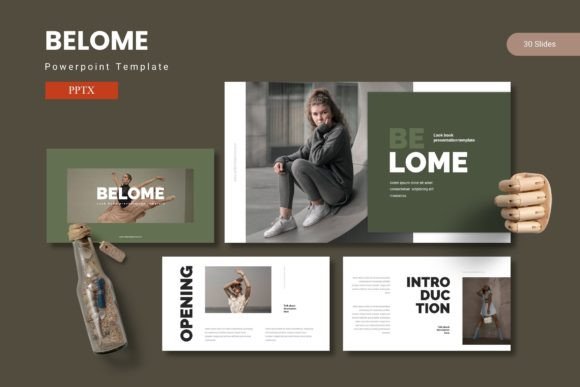
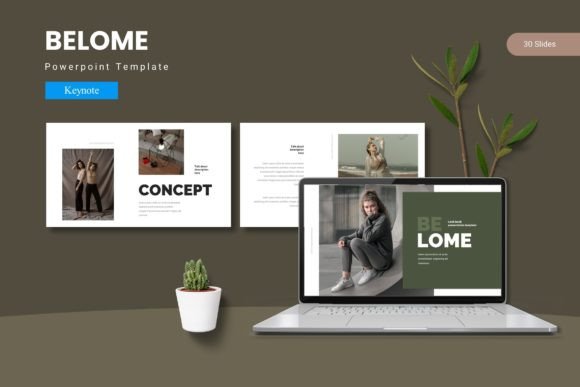
What immediately sets Belome apart is its systematic approach. This isn't a random assortment of layouts. The template is built on a foundation of master slides, ensuring every element—from fonts to margins—stays consistent across your entire deck. This is crucial for maintaining a professional brand identity. You won't find one slide with a serif heading and another with a casual script; the typographic hierarchy is pre-defined and intentional, guiding your audience's eye exactly where it needs to go.
The visual personality of Belome strikes a perfect balance. It’s clean and modern without being cold. The layouts breathe, using ample white space to let your content shine. The included handcrafted infographics and pixel-perfect illustrations are where it truly excels. These aren't generic clip-art. They are custom-drawn assets with a cohesive, slightly abstract style that feels contemporary and engaging. Whether you're visualizing data, explaining a process, or showcasing a timeline, these graphics add a layer of sophistication that stock images simply can't match.
Five Color Palettes, Endless Possibilities
A key feature is the inclusion of five premade color schemes. This is a practical game-changer. Instead of forcing you to adopt a single color story, Belome provides curated palettes that range from bold and energetic to muted and professional. This versatility makes the template adaptable to virtually any industry or presentation context. A tech startup might choose a vibrant, contrasting scheme, while a financial consultant could opt for a more subdued, trust-building palette. Each scheme is applied across all 30+ slides per template, ensuring instant visual harmony.
The real-world value here is immense. For entrepreneurs and small business owners, this means you can quickly align a presentation with your existing brand colors without becoming a color theory expert. For designers and agencies, it offers a rapid way to prototype client presentations. The picture placeholder functionality is another huge time-saver. Simply drag and drop your images into the pre-formatted areas, and they automatically crop to fit the design frame, maintaining the slide's perfect proportions every time.
Practical Guidance for Your Next Project
So, how do you know if Belome - Keynote Template is the right fit? Consider its strengths. It excels in scenarios where you need to present complex information clearly: investor pitches, quarterly business reviews, project proposals, educational lectures, and portfolio showcases. The dedicated gallery and portfolio slides are particularly well-designed for creatives—photographers, architects, or product designers—looking to display their work without distracting borders or clutter.
When evaluating the template, think about your audience. The modern, clean aesthetic appeals to a broad demographic, from 20 to 50, but its professional edge makes it especially suitable for B2B communications, academic settings, and corporate environments. It’s a premium font (in the sense of a premium design asset) that prioritizes readability. The typography choices within the template are designed for screen viewing, with careful attention to size, weight, and spacing that ensures your words are legible even in the back of a conference room.
Getting started is straightforward. The main file includes the five Keynote files, each with 30 fully editable slides. The Readme First document is essential reading—it details the fonts and photos used. For complete commercial licensing and to ensure all assets are cleared for your use, always check the documentation provided by the template creator. A pro tip: spend an hour simply clicking through every slide in the template. Familiarize yourself with the structure. You'll discover clever layouts for everything from team bios to feature comparisons, giving you a mental library of design solutions for future projects.
Ultimately, the Belome - Keynote Template is about efficiency and impact. It removes the friction from design, allowing you to produce presentations that are not only informative but also visually compelling and professionally consistent. In a world where attention is scarce, starting with a polished, well-organized foundation isn't a luxury—it's a strategic advantage.