HealthKita: A Medical PowerPoint Template for Clear Presentations
Creating a presentation in the medical or health sector requires a specific kind of clarity. You're dealing with complex information, sensitive topics, and an audience that needs to trust what they see. The HealthKita - Medical PowerPoint Template is built with this reality in mind. It’s not just a collection of pretty slides; it's a structured framework designed to help healthcare professionals, medical researchers, pharmaceutical marketers, and health educators communicate with precision and authority.
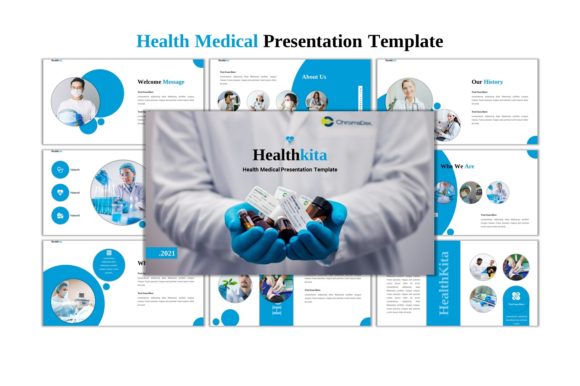
At its core, HealthKita is a set of 45 unique slides, each crafted to serve a distinct purpose within a medical presentation. The visual personality is clean, professional, and trustworthy. You’ll find a balanced use of space, a calming yet authoritative color palette (which you can easily change), and layouts that prioritize content readability. The style leans modern but avoids trendy distractions, understanding that in this field, the message must remain the focal point. It’s a template that says, "We take this seriously," which is exactly the brand perception most medical communicators aim to build.
Practical Applications Beyond the Hospital Boardroom
While its name suggests a medical focus, the utility of a well-organized, professional template like HealthKita extends far beyond clinical settings. Its strength lies in its structured approach to presenting complex information, making it valuable for anyone who needs to educate, report, or persuade.
For entrepreneurs and startups in the health-tech or wellness space, this template is invaluable for investor pitches. It allows you to present market data, product efficacy, and business models with the same level of professionalism as your clinical claims. Marketers at pharmaceutical companies or health service providers can use it to craft internal strategy decks or external training materials that maintain brand consistency. Bloggers and content creators in the wellness niche can adapt its infographic and mockup slides to create compelling visual guides or workshop materials for their audiences.
The included assets significantly broaden its appeal. With over 2,000 editable icons, you’re equipped to visualize concepts across biology, technology, business, and general processes. The included photos from Pexels and Unsplash provide high-quality, relevant imagery right out of the box, saving hours of stock photo hunting. This makes it a practical toolkit for small business owners developing training manuals, publishers creating educational content, or even crafters and hobbyists planning a detailed community workshop.
The Power of Editable Design Assets
A major pain point with many templates is the lock-in effect. HealthKita sidesteps this by being entirely editable within PowerPoint itself. There’s no need for additional software like Adobe Illustrator or InDesign. Every graphic, chart, and placeholder is fully resizable and customizable. This is a game-changer for those without a design background. You can directly input your content, drag and drop your own images into the placeholders, and adjust the color scheme to match your organization’s brand identity in minutes.
This level of control directly influences the professionalism and consistency of your final presentation. You’re not fighting the template; you’re guiding it. The inclusion of the Tinos and Roboto fonts is a thoughtful choice. Tinos, a serif font, offers excellent readability for body text and a sense of tradition, while Roboto, a sans-serif, provides clean, modern headings. This built-in font pairing establishes a clear visual hierarchy, ensuring your audience can easily follow the flow of information from title to detail.
Making HealthKita Work for Your Project
Before diving in, consider your project's specific needs. Evaluate the 45 slides—does the mix of data-driven charts, process flows, and image-heavy layouts align with your content? The best approach is to open the file and browse the slide master. See how the placeholders are arranged and imagine your own content within them.
Testing is straightforward. Duplicate a slide and experiment. Change the accent color to your brand’s primary hue. Swap out the sample image for your own product photo or team picture. Adjust the text size and see how the layout adapts. This hands-on trial will quickly show you the template’s flexibility and help you gauge its fit for your brand identity.
Remember, a template is a starting point, not a finished product. Use the infographic slides to break down a complex medical procedure or a business process. Leverage the mockup slides to showcase a new medical device or a wellness app interface in a realistic context. The goal is to use the structure to amplify your message, not to let the design overshadow it.
In a world where attention is fragmented, presenting information with clarity, credibility, and visual coherence is non-negotiable. The HealthKita - Medical PowerPoint Template provides the tools to achieve exactly that, whether you’re explaining a new treatment protocol, pitching a health startup, or educating a community. It turns the daunting task of presentation design into a manageable, focused process, allowing you to concentrate on what truly matters: your message. Get it now and see how a solid foundation can transform your next presentation.