Illuminate Your Ideas with the Light Bulb Infographic Template
Every business owner, marketer, or creative professional knows the struggle of turning a brilliant idea into a visual reality. You have the concept, the strategy, and the data, but often the tools to present them are either too rigid or require expensive, specialized skills. This is where the Light Bulb - Infographic Presentation Template changes the game. It’s not just a set of slides; it’s a strategic design asset built to make your business illustrations in media presentations clearer, more engaging, and stylistically cohesive without the steep learning curve.
A Design Built for Clarity and Modern Appeal
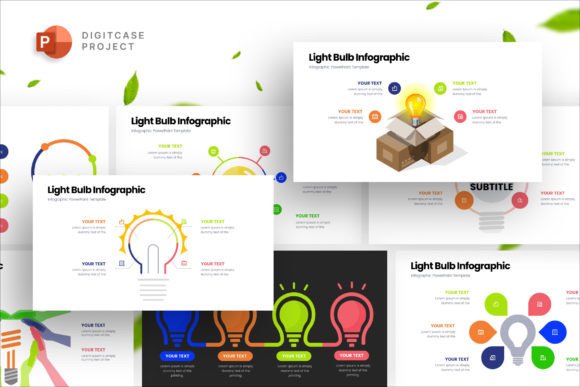
The core personality of the Light Bulb Infographic Presentation is one of modern professionalism and intuitive understanding. Visually, it moves away from cluttered, outdated chart styles. Instead, it leverages clean lines, balanced white space, and a contemporary color palette to ensure your data and narrative are the stars. The light bulb motif isn't just decorative; it's a universal symbol for ideas, innovation, and solutions, setting a positive and forward-thinking tone for your entire message.
What makes this template particularly useful is its foundation as a fully vector-based asset. This means every icon, chart, and graphic element is built with mathematical precision, not pixels. The practical benefit? You can resize any component to fit a massive conference screen or a small social media graphic without losing a single bit of sharpness. Combined with a full responsive 16x9 HD ratio display, your presentation will look flawless whether viewed on a laptop, projected in a boardroom, or shared on a digital platform.
Where This Template Truly Shines
The versatility of the Light Bulb Infographic Presentation makes it a valuable tool across numerous professional and personal projects. Its clean, structured approach to visual information makes it ideal for:
- Business and Marketing Reports: Transform quarterly results, market analysis, or campaign performance into a compelling visual story. The template’s structure helps guide the audience through complex data, improving comprehension and retention.
- Startup Pitch Decks: For entrepreneurs, clarity is currency. This template helps articulate problem statements, solutions, and business models with a professional sheen that builds investor confidence.
- Educational and Training Materials: Whether you’re a corporate trainer or an online educator, breaking down processes, timelines, or concepts into digestible infographics enhances learning.
- Internal Communications: Use it for company announcements, project updates, or onboarding materials. A well-designed internal presentation boosts engagement and ensures everyone is aligned.
- Social Media and Digital Content: Isolate individual infographic slides from the template to create standalone graphics for LinkedIn, Instagram, or blog posts. This is a smart way to maintain visual consistency across your brand identity and digital footprint.
Think of it as a premium font for your visual communication. Just as a carefully chosen typeface influences the tone of a document, this infographic template sets the stylistic and structural framework for your visual message, ensuring it feels cohesive and credible.
Practical Guidance for Seamless Integration
Getting the most out of this asset is straightforward, thanks to its user-centric design. Here’s how to approach it practically:
Evaluate the Fit: Before diving in, consider your project’s core need. Is it data visualization, process explanation, or conceptual storytelling? The Light Bulb - Infographic Presentation Template excels at all three, but knowing your goal helps you select the most relevant slides from the 26 available options. Its creative and professional style is versatile, but always ensure the visual tone aligns with your brand’s personality—be it corporate, innovative, or educational.
Customize with Confidence: The promise of "full and easy editable" elements is a major advantage. Because all shapes are vectors, you can change colors with a few clicks to match your brand guidelines perfectly. The master slide options are a time-saver; updating a logo or a background element on the master slide automatically propagates the change throughout the entire presentation, ensuring instant consistency. The drag-and-drop functionality for uploading images simplifies personalization, allowing you to inject your own photography or product shots seamlessly.
Test the Readability and Flow: A beautiful design fails if it doesn’t communicate. After customizing, view your presentation in presentation mode. Check the visual hierarchy: do the most important points stand out? Is the flow logical from one slide to the next? The template’s structure is designed to guide the eye, but your content needs to follow that path. Ensure text is legible, using the free font provided or pairing it with another clean sans serif font that complements your brand’s web design or editorial design style.
Remember the Licensing: The template is provided for use, but stock photos are not included. This is a common and fair practice. It gives you the freedom to source imagery that is unique to your brand and message, avoiding the generic look of overused stock photos. Always ensure any additional assets you integrate (like specific icons or photos) have the appropriate license for your intended use, whether for personal projects or commercial client work.
In the end, the Light Bulb Infographic Presentation is more than just a collection of slides. It’s a design asset that empowers you to communicate with the clarity and polish of a seasoned designer. It handles the heavy lifting of structure and style, freeing you to focus on what matters most: your message. By integrating it thoughtfully into your workflow, you can elevate everything from internal memos to high-stakes pitches, ensuring your ideas are always presented in their best light.