Interior Design Google Slides Template: A Designer's Practical Guide
If you've ever spent hours trying to build a presentation from scratch—aligning text boxes, sourcing images, fiddling with color palettes—you know how quickly a simple deck can turn into a time sink. The Interior Design Google Slides Template exists to solve that problem. It's not just a collection of pretty slides; it's a structured, presentation-ready framework designed for professionals who need to communicate ideas clearly and visually. Whether you're pitching a new client, presenting a portfolio, or outlining a company profile, this template gives you a polished starting point that respects your time and creative energy.
What Makes This Template Stand Out
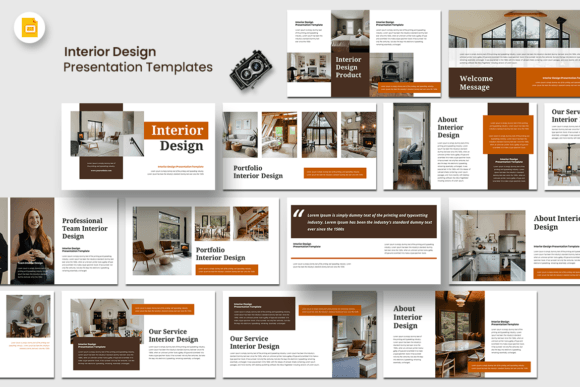
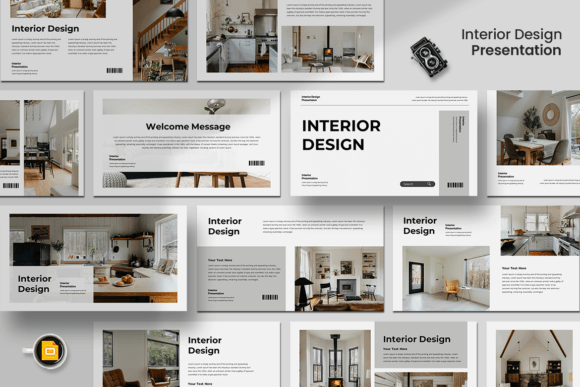
At its core, the Interior Design Google Slides Template is built around clean, modern typography and a restrained visual aesthetic. The slides use a 16:9 widescreen ratio, which is the standard for most projectors and screens today. Each of the 15 custom slides is designed with intentional layout structure—there's a clear visual hierarchy that guides the viewer's eye from headline to supporting content without overwhelming them.
The template uses free fonts, which means you won't run into licensing headaches when sharing or presenting. Text is fully editable, as are shapes, colors, and other design elements. If your brand uses a specific color palette, you can adjust everything in minutes. The image placeholders use a drag-and-drop system, so swapping in your own photography or product shots takes seconds rather than the tedious cropping and resizing you'd deal with in a blank presentation.
What I appreciate most is the restraint in the design. There's no clip art, no gratuitous animations, no decorative flourishes competing for attention. The slides let your content breathe. That's a quality you don't always find in templates marketed toward creative professionals—many overdesign every element, which actually makes customization harder.
Where This Template Works Best
The name suggests interior design, and yes, it's an excellent fit for architects, interior decorators, and home staging professionals. But the applications go well beyond that. The clean, editorial layout works naturally for creative agencies presenting work to clients, startups building pitch decks for investors, photographers showcasing portfolios, and small business owners putting together a company profile.
Think about the last time you saw a poorly designed presentation. Chances are, the content was fine, but the delivery undermined the message. Mismatched fonts, inconsistent spacing, low-resolution images—these details erode trust before you've finished your first slide. A template like this prevents that. It gives you a professional baseline so you can focus on what you're actually saying rather than how it looks on screen.
For marketers and content creators, the template works well for social media strategy presentations, campaign overviews, and brand identity proposals. Bloggers and publishers can use it for media kits or partnership pitches. The versatility comes from the neutral, modern design language—it doesn't impose a specific aesthetic on your content, which means it adapts to different industries and audiences without feeling out of place.
Design Decisions That Matter in Presentations
Good presentation design follows the same principles as good typography and visual communication. You need a clear hierarchy—headline, subhead, body text—so the audience knows where to look first. The Interior Design Google Slides Template handles this through deliberate font sizing, strategic white space, and consistent alignment across slides. This isn't accidental. These are the same principles you'd apply in editorial design, web design, or packaging design.
One thing I always recommend: even with a strong template, spend time on your image choices. The drag-and-drop placeholders make it easy, but easy shouldn't mean lazy. Use high-resolution images that match the tone of your presentation. If you're pitching a luxury brand, your photography should reflect that. If you're presenting data for a startup, clean charts and infographics will serve you better than stock photos of handshakes.
Font pairing is another consideration worth your attention. The template's default fonts are chosen to complement each other, but if you're customizing, test your combinations before committing. A serif font paired with a clean sans serif often works well for presentations—the serif draws attention to key points while the sans serif keeps body text readable at a distance. Avoid script fonts or highly decorative typefaces for anything that needs to be legible from the back of a room.
Practical Tips for Getting the Most Out of This Template
First, start with your content outline before touching the slides. Know your narrative arc—what's the problem, what's your solution, what's the ask? Then map that structure onto the 15 slides. The template includes enough variety for a complete presentation, but not every slide needs to be used. A focused 10-slide deck often lands better than a sprawling 15-slide one.
Second, maintain brand consistency. If you're using this for client work or your own business, set your brand colors and fonts once, then apply them across every slide. The template's editable structure makes this straightforward. Consistency in your visual language builds recognition and professionalism—two things that directly influence how your audience perceives your credibility.
Third, review the template's included styles before you start. Each slide serves a different purpose—title slides, content-heavy layouts, image-forward compositions, data slides. Understanding what's available helps you choose the right layout for each section of your presentation rather than forcing content into a slide that doesn't fit.
Finally, remember that a template is a starting point, not a finished product. The real value comes from how you adapt it to your specific needs. The Interior Design Google Slides Template gives you the structure and visual polish—you bring the ideas, the personality, and the strategy. That combination is what makes a presentation memorable.
A Smart Investment for Any Creative Professional
Whether you're a freelance designer building client presentations, an entrepreneur preparing for investor meetings, or a small business owner putting together a brand overview, having a reliable, presentation-ready template saves you hours of work and eliminates the guesswork from visual design. The Interior Design Google Slides Template delivers exactly that—a professional, adaptable, and easy-to-use foundation for your most important presentations.